How Subscriptions Work
Subscriptions power the recurring delivery of supplements to your patients. Once a patient checks out a protocol, a subscription is created that automatically renews and ships new orders on a set schedule.
How a Subscription Is Created
- You create a protocol for a patient.
- The patient receives a checkout link and completes payment.
- A subscription is activated with the products and dosing schedule from the protocol.
Renewal Cycle
The days supply you set on the protocol determines how often the subscription renews:
| Days Supply | Renewal Frequency |
|---|---|
| 30 days | Monthly |
| 60 days | Every two months |
| 90 days | Quarterly |
When a subscription renews, a new order is created and shipped to the patient automatically — no action required from you or the patient.
Subscription Statuses
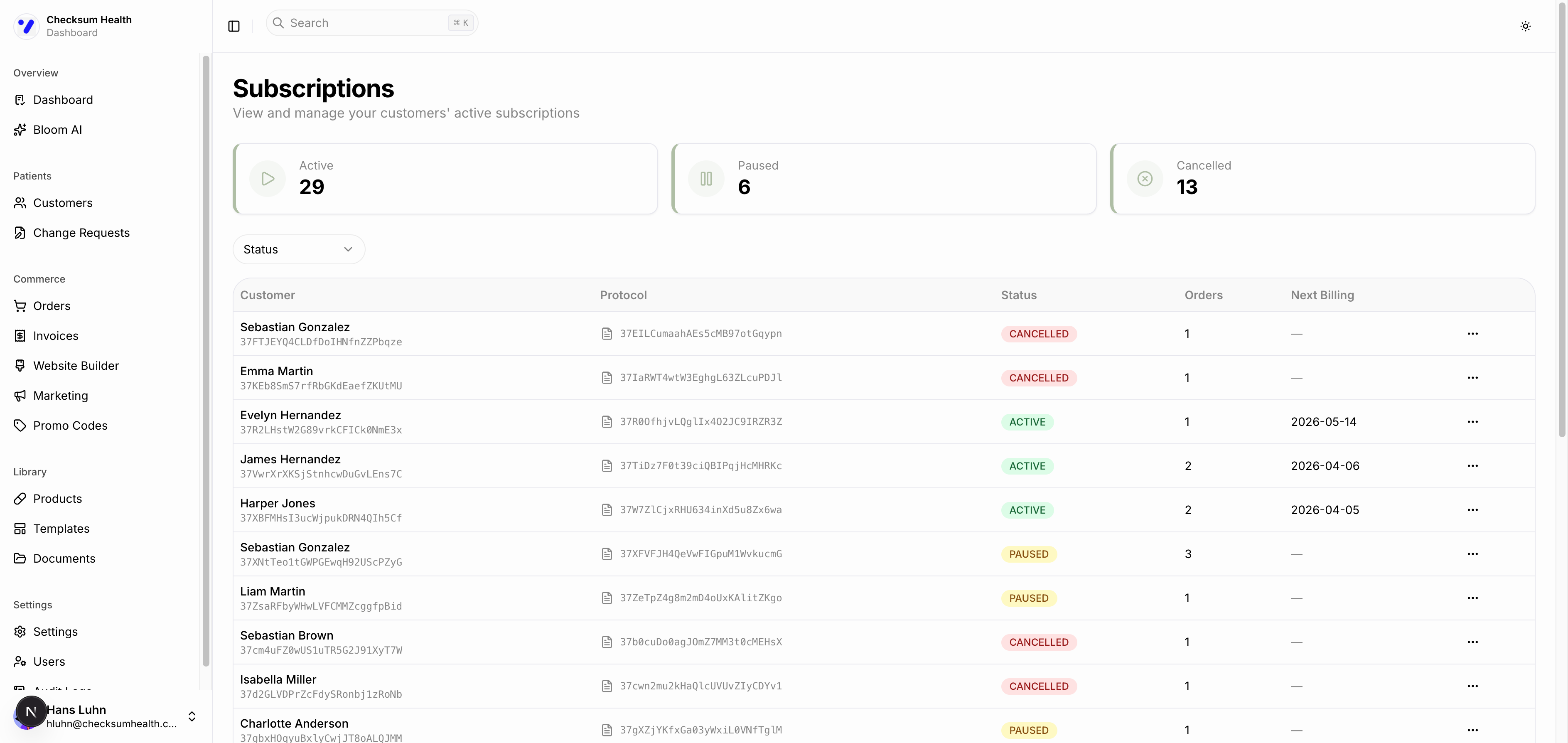
| Status | Description |
|---|---|
| PENDING | Protocol created, awaiting patient checkout. |
| ACTIVE | Patient has checked out. Renewals happening on schedule. |
| PAUSED | Temporarily on hold. No renewals until resumed. |
| CANCELLED | Permanently ended. No further renewals. |
| FAILED | Payment failed. Retries will be attempted automatically. |
Viewing Subscriptions
- Click Subscriptions in the sidebar (under Commerce, if available) or navigate from a customer or order detail page.
- Use the Status filter to narrow the list.
- The table shows: Customer, Protocol, Status, Orders count, and Next Billing date.